RooCode: A Complete Guide to the AI-Agent VS Code Coding Extension
RooCode was a free, open-source VS Code extension where multiple AI agents collaborated like a dev team. The extension was shut down on May 15, 2026 and its GitHub repository archived; this guide is kept as a record of how it worked, with migration options noted.
Update, September 9, 2026: The RooCode extension was shut down on May 15, 20262. Its GitHub repository was archived by the owner the same day and is now read-only2. The official site roocode.com now redirects to roomote.dev4. RooCode, Inc. points to two options for people looking for an alternative: ZooCode, a fork started by the RooCode community, and Cline, the project RooCode originated from. The text below is a record as of June 2025; its feature and figure descriptions no longer reflect the current situation.
RooCode, an AI-powered coding assistant available as a Visual Studio Code (VS Code) extension, is rapidly gaining traction in the developer community. This open-source and free-to-use tool stands out as a groundbreaking solution where multiple AI agents collaborate like a development team, supporting a wide range of development tasks from code generation to debugging.
RooCode has achieved 616,116 downloads on the VS Code Marketplace and earned a perfect 5-star rating from 287 reviews1. On GitHub, it has garnered 16,100 stars and 5,900 forks, with an active community of over 50 contributors participating in its development2.
The Birth and Evolution of RooCode
RooCode’s history began as a fork of a VS Code extension called “Cline”. Initially developed under the name “Roo Cline”, after achieving over 50,000 installations, the team decided to chart their own course and rebranded to “RooCode”3.
This name change represented more than just a rebranding—it signified a major expansion in the product’s direction and functionality. Development has proceeded under RooCode, Inc. as an organization, and the project is published as an open-source project under the Apache 2.0 license.
Development History and Philosophy
The RooCode development team aimed to solve the limitations and challenges of existing AI coding assistants. They particularly emphasized the following points:
- Flexibility: Design independent of specific AI models
- Transparency: System allowing users to control all operations
- Extensibility: Customizable modes and tools
- Community: Collaborative development through open source
Key Features and Characteristics of RooCode
1. Multi-file Code Management
One of RooCode’s greatest strengths is its ability to understand the entire project context and efficiently manage changes across multiple files. With diff-based editing capabilities, it can proceed with large-scale refactoring while protecting existing valid code.
2. Support for Multiple AI Models
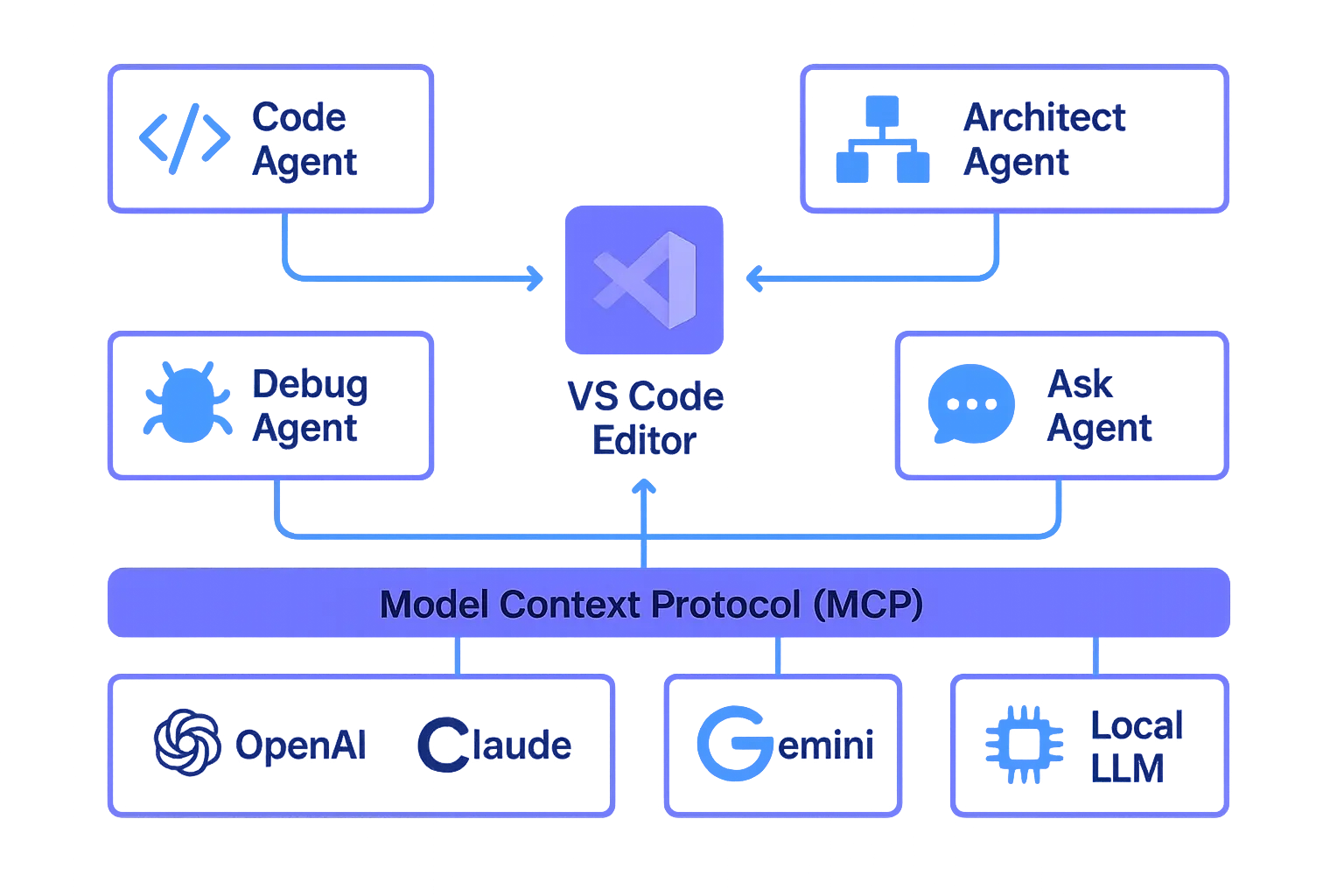
RooCode is designed to be independent of specific AI providers and supports a diverse range of models:
- OpenAI (GPT-4, GPT-3.5, etc.)
- Anthropic Claude
- Google Gemini 2.5 (Pro, Flash, Flash Lite)
- Local LLMs (via Ollama, etc.)
The June 17, 2025 update (version 3.21) added support for the latest Gemini 2.5 models and also implemented Excel file (.xlsx) read/write functionality4.
3. Specialized Mode Switching
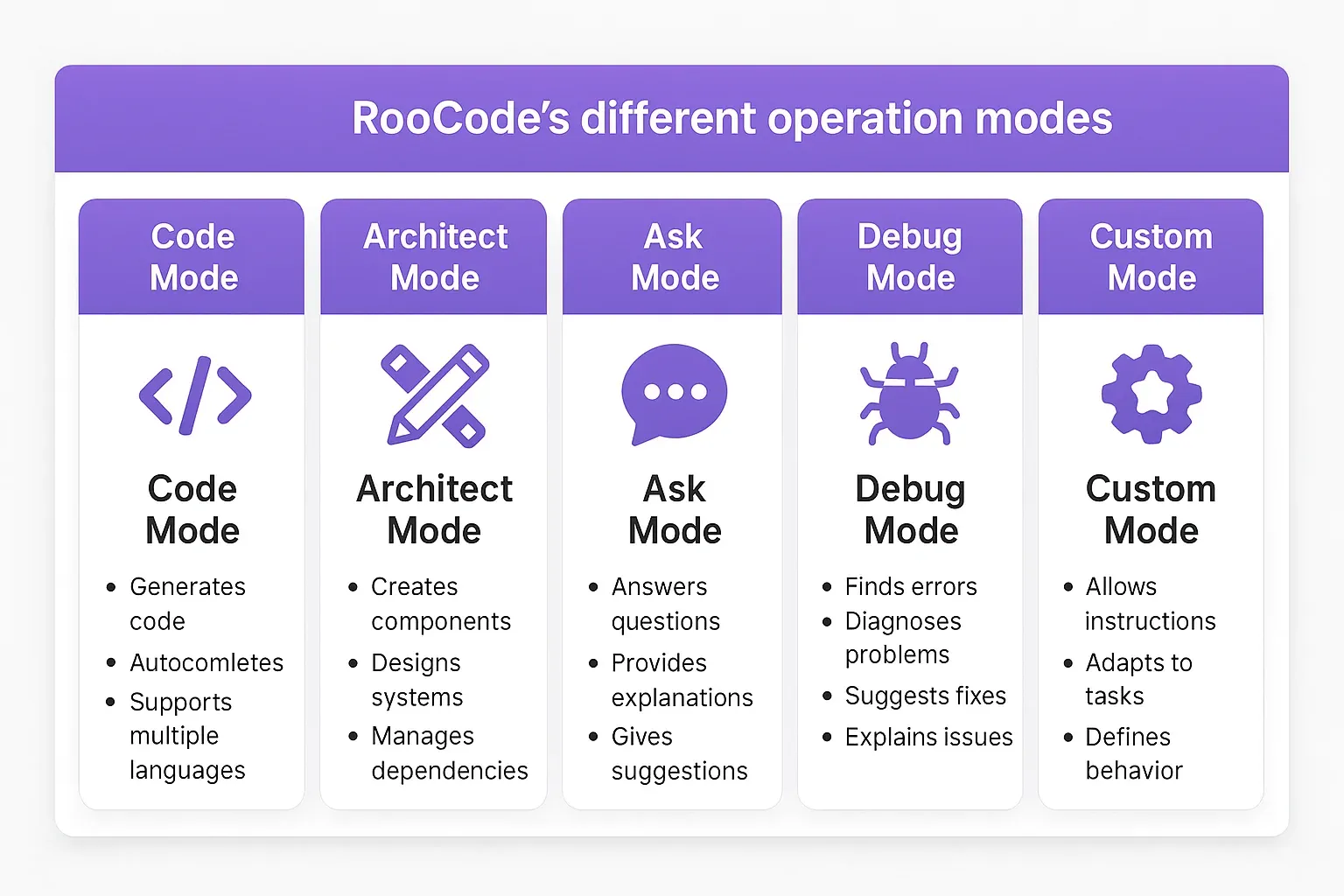
RooCode provides the following modes for different use cases:
| Mode | Purpose | Features |
|---|---|---|
| Code Mode | General coding tasks | Code generation, refactoring, bug fixes |
| Architect Mode | Technical leadership | System design, architecture proposals |
| Ask Mode | Information gathering and answers | Technical Q&A, documentation reference |
| Debug Mode | Problem diagnosis | Error analysis, performance improvement suggestions |
| Custom Mode | Customizable | User-defined specialized personas |
4. Model Context Protocol (MCP) Support
MCP is a crucial feature that significantly enhances RooCode’s extensibility. This enables developers to:
- Integrate with external APIs
- Connect to databases
- Create custom tools
- Implement specialized development workflows
5. Controllable Automation
RooCode can adjust its operation mode according to user needs:
- Manual Approval Mode: Manual approval for all operations
- Autonomous Mode: Automatic execution of routine tasks
- Hybrid Mode: Automation only for specific operations
Why RooCode is Popular
1. Completely Free and Open Source
RooCode’s basic features are completely free to use, and users can get started by simply providing API keys for their chosen AI models. Even when using paid AI models, there are no fees to pay to RooCode itself.
2. Real Productivity Improvements
User reviews report significant time savings in actual development work:
“Projects that used to take a full day now wrap up before lunch” - From Michael’s review5
“RooCode has the best features and capabilities, along with the best development team. They’re amazingly fast to support new models and implement useful functionality” - From another user review
3. Active Community and Support
RooCode provides community support through multiple channels:
- Discord server (real-time support)
- Reddit subreddit (experience sharing)
- GitHub Issues (bug reports and feature requests)
- X (formerly Twitter) @roo_code
- Bluesky (roocode.bsky.social)
4. Continuous Improvements and New Features
On June 17, 2025, the Roo Marketplace was launched, creating an ecosystem where users can share custom modes and tools they’ve created. This makes it easy to find solutions specialized for specific development scenarios.
RooCode Use Cases
Case 1: Full-stack Development
RooCode supports development by understanding the entire project context from frontend to backend. For example, when creating React components, it provides suggestions that also consider related API endpoints and database schemas.
Case 2: Legacy Code Refactoring
In modernizing large legacy codebases, RooCode suggests gradual improvements while protecting existing functionality. It understands dependencies across multiple files and presents safe refactoring paths.
Case 3: Test-Driven Development (TDD)
By using custom modes to create QA engineer personas, it supports comprehensive test case generation and edge case discovery.
Future Outlook
The RooCode development team is planning further feature expansions:
- Support for more advanced AI models
- Enhanced enterprise features
- Improved security and privacy features
- Support for more programming languages and frameworks
RooCode exemplifies the democratization of AI-assisted development through open-source innovation. With over 610,000 downloads and a 4.8/5 rating, it has proven that high-quality AI coding assistance doesn’t require expensive subscriptions or proprietary lock-in.
The extension’s strength lies in its flexibility - supporting multiple AI providers, allowing local model deployment, and offering extensive customization options. This approach empowers developers to choose their preferred AI models while maintaining control over their data and workflow. As AI becomes integral to software development, RooCode’s open architecture and community-driven development model position it as a sustainable alternative to closed-source competitors, ensuring that advanced AI assistance remains accessible to all developers regardless of budget or organizational constraints.
Sources
- Roo Code (prev. Roo Cline) - Visual Studio Marketplace - VS Code Marketplace official page
- GitHub - RooCodeInc/Roo-Code - RooCode official GitHub repository (archived May 15, 2026; carries the shutdown and migration notice)
- Cline vs. Roo Code – Which VS Code extension is better - Comparison article by 4sysops
- Roo Code – Your AI-Powered Dev Team in VS Code - RooCode official website (redirects to roomote.dev as of September 9, 2026)
- Top RooCode Alternatives in 2025 - User reviews by topai.tools
Was this article helpful?
Thank you!
Received. Thank you!