What Is WebLLM? Running LLMs in the Browser with WebGPU
What is WebLLM, the engine that runs large language models entirely inside a web browser with no server? A plain-language guide to how it works with WebGPU and WebAssembly, its OpenAI-compatible API, and its privacy and offline benefits, based on the official paper and repository.
AI chat services like ChatGPT and Claude typically work by sending your text across the internet to the provider’s servers, where it is processed before the result is returned to you. WebLLM takes the opposite approach: it runs a large language model (LLM) entirely inside the browser on the computer in front of you, without sending your text to any server.
WebLLM is a JavaScript library that lets you run an LLM in a web browser3, with no app to install and no dedicated server required. The key enabler is WebGPU, a new technology that lets the browser directly use the computer’s GPU (graphics processing unit). This article explains what WebLLM is, why an AI can run without a server, and its mechanics, strengths, and weaknesses, based on the official paper and repository. Reading it alongside the basics of what an LLM is will make the bigger picture easier to grasp.
What Is WebLLM: An AI That Runs Inside the Browser
WebLLM is a high-performance in-browser LLM inference engine published by the MLC (Machine Learning Compilation) project2. An “inference engine” is the part that actually runs a trained AI model to generate answers. What sets WebLLM apart is that it completes this processing entirely inside the user’s browser, without relying on the provider’s servers2.
To picture how it works: the AI model itself (a file ranging from a few hundred megabytes to several gigabytes) is downloaded into the browser just once at the start, and from then on the model runs locally. Once downloaded, the model is saved in the browser’s cache storage, so loading time is shortened on subsequent uses3.
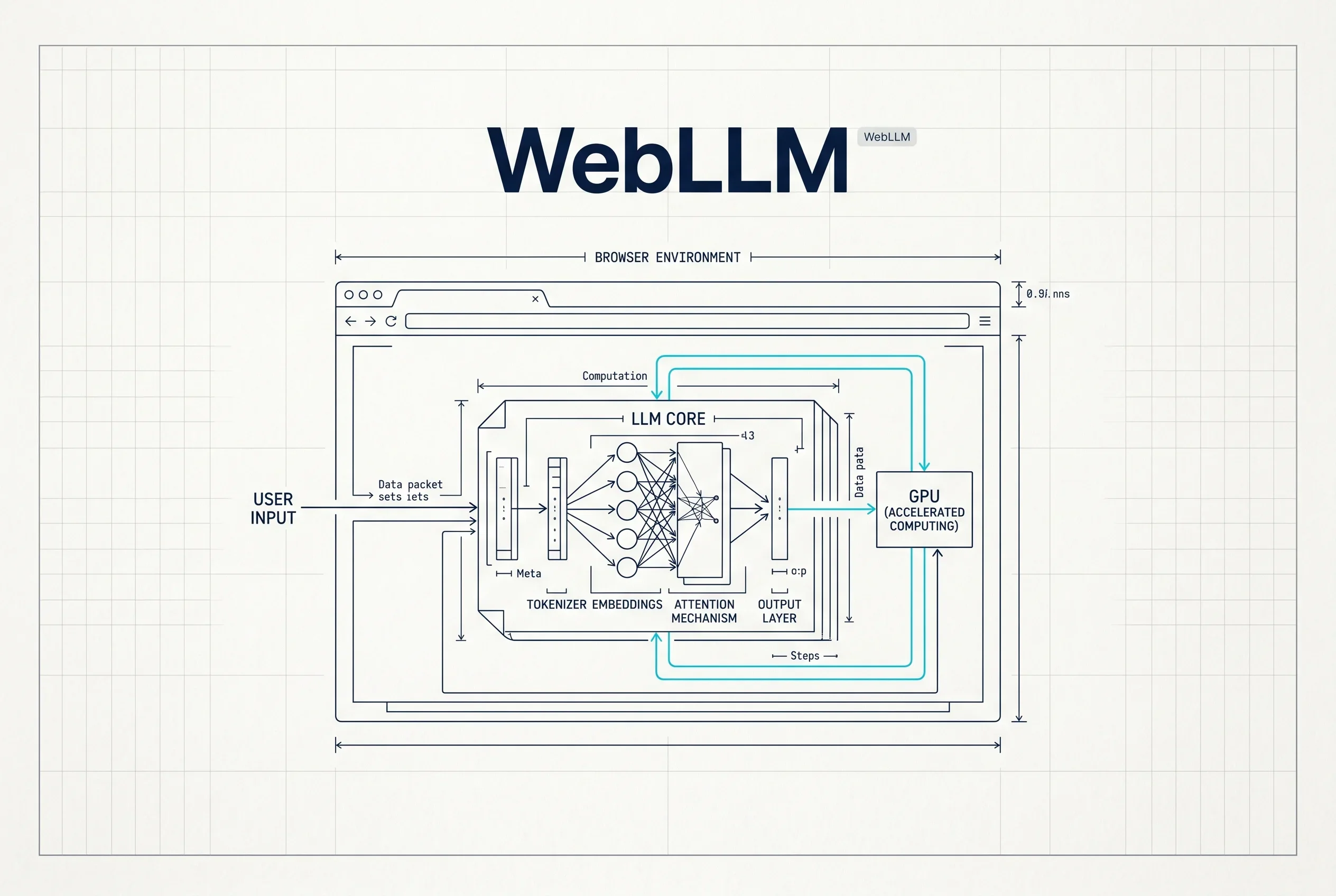
The foundation for this technology is laid out in the paper “WebLLM: A High-Performance In-Browser LLM Inference Engine” (Charlie F. Ruan et al.), published in December 20241. The paper shows that WebLLM “leverages WebGPU for efficient local GPU acceleration and WebAssembly for performant CPU computation,” operating without the need to set up a server or a dedicated GPU1.
How It Works: Powered by WebGPU and WebAssembly
WebLLM can run in the browser alone thanks to two technologies added to browsers in recent years.
The first is WebGPU. This is a technology that “directly accesses the GPU from the browser to achieve high-speed computation”3, allowing the large volume of matrix calculations an LLM needs to run quickly inside the browser. AI processing is fundamentally a strength of GPUs, but earlier browsers could not use the GPU this freely. The arrival of WebGPU is what made running an LLM inside the browser practical.
The second is WebAssembly (Wasm). WebLLM uses WebGPU for GPU acceleration and high-performance WebAssembly for CPU computation, dividing the work between them4. Internally, it also incorporates techniques such as PagedAttention and FlashAttention that improve memory efficiency and speed4.
The structure that supports this processing is carefully designed as well. WebLLM is split into two engines: the front-end ServiceWorkerMLCEngine provides the OpenAI-like API described below, while the back-end MLCEngine runs on a Web Worker and separates the heavy computation from the display (the UI thread)4. As a result, the screen is less likely to freeze while the AI is thinking. Optimizing the models for this relies on machine learning compilers called MLC-LLM and Apache TVM, which provide WebGPU kernels optimized for the browser1.
OpenAI-Compatible API and Supported Models
A point that makes WebLLM easy for developers is that it is fully compatible with the OpenAI API2. Because you can write code the same way you would for the ChatGPT API, apps already built for OpenAI can be switched to in-browser execution with relatively small changes. It also supports streaming output (showing the answer bit by bit), JSON-formatted output, and random seed settings2.
The range of models it can run is broad, covering multiple families of open models such as Llama 3, Phi 3, Gemma, Mistral, and Qwen2. These are mainly open models published on platforms like Hugging Face, and include lightweight models such as Google’s Gemma. It can be installed via package managers like NPM or yarn, or loaded directly from a CDN2. It is released under the Apache-2.0 license2, making it easy to use, including for commercial purposes.
How Fast Does It Run?
“Running inside the browser” might sound slow, but performance is kept surprisingly high. According to the paper, WebLLM can retain up to 80% of native performance on the same device1. “Native performance” refers to the speed of running the model directly on the computer without going through a browser.
Concrete measurements are provided as well. On a MacBook Pro (M3 Max), Llama-3.1-8B reached 41.1 tokens per second (71.2% of native performance), while the smaller Phi-3.5-mini reached 71.1 tokens per second (79.6%)4. A token is the unit AI uses to handle text, and a rate of several dozen tokens per second is practical enough for text to appear smoothly (actual speed varies with the device’s performance and the size of the model).
Benefits and What It Is Suited For
WebLLM’s benefits come from its server-free structure. The biggest is privacy: because “input data is not sent to a server, sensitive information can be handled with peace of mind”3. In situations where you want to use AI on documents that cannot leave the organization, this property carries significant weight.
Another benefit is offline operation. Because “once you download the model, you can use it without an internet connection”3, it can be used regardless of network conditions. In addition, since processing happens on the user’s device, the provider does not have to bear the cost of AI processing on servers.
That said, it is not a cure-all. Because it runs in the browser, it is centered on relatively small open models, and it cannot run the latest largest-scale models as-is. Performance also depends on the specs of the user’s computer, and there is the overhead of downloading the model and the associated data usage at the start. In terms of use cases, it pairs well with internal tools where confidentiality matters, embedding lightweight chat features, and apps built on the assumption of offline use.
From the perspective of where to run an LLM, there are two approaches: running it on a cloud server, or running it on a device at hand. WebLLM is an option that achieves the latter “in the browser alone,” without installing any special app. As one of the foundations for using AI in a more accessible and more secure way, it is likely to remain a basic technology that gets referenced going forward, alongside techniques such as model compression.
Sources
- WebLLM: A High-Performance In-Browser LLM Inference Engine - Paper by Charlie F. Ruan et al. demonstrating an in-browser LLM inference engine (2024)
- mlc-ai/web-llm - Official repository by MLC-AI (supported models, OpenAI-compatible API, license)
- WebLLM: A Guide to Running LLMs in the Browser - Japanese explainer by Monaca Press
- Paper Digest: WebLLM, a High-Performance In-Browser LLM Inference Engine - Japanese paper commentary by AI Nest
Was this article helpful?
Thank you!
Received. Thank you!